Introduction
Many years ago, back in the mid to late eighties, I took Computer Studies in high school where I occasionally got to 'see' a BBC Micro and then, finally, the legendary Archimedes. Obviously, the school only had a couple of BBC Micros and one Archimedes, so access was limited. At some point, someone showed me the game 'Zarch' running on the Archimedes, which totally amazed me. Back at home, my neighbour had a ZX Spectrum where I played TLL and Cyclone—two games that I thought made brilliant use of the limited hardware available.
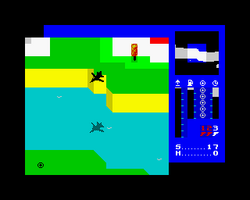
TLL - ZX Spectrum Classic

Zarch - Acorn Archimedes
A number of years passed where I studied Computer Science at university. With my passion for C++ programming, I started to learn OpenGL and created a 3D modelling application for my final year thesis. After university, while looking for a job, I had to make a decision: move into game development or pursue more traditional enterprise application development. Needing the money, I chose the latter.
Now, many years later, I find myself fondly remembering those development times and the games I used to play. I've decided that I should use what little spare time I have to rekindle some of that enjoyment. This is my record of learning OpenGL again and creating a game (or game engine) that evokes some of that fun from my youth.
Project Overview
Zarch is a 3D flight simulator and terrain editor built with Java 21 and LWJGL3 (Lightweight Java Game Library). The project features a player-controlled ship, procedurally generated terrain with real-time editing capabilities, advanced graphics (shadows, lighting, particles, weather effects), physics simulation, and an OpenAL-based audio system.
Technology Stack
Java 21 - Primary language
LWJGL 3.3.6 - OpenGL, OpenAL, GLFW bindings
JOML 1.10.8 - Java OpenGL Math Library
Maven - Build system
Google Guava 33.4.0 - Utilities
JUnit Jupiter 5.11.4 - Testing
Architecture Overview
Entry Point and Game Loop
Main entry: src/main/java/home/opengl/Launcher.java instantiates FloorTest as the game logic implementation
Game loop: EngineManager implements a fixed timestep loop (60 UPS for updates, 60 FPS for rendering)
Logic interface: All game implementations must implement the Logic interface (init, input, update, render, cleanup)
Core Systems
Rendering Pipeline (src/main/java/home/opengl/core/rendering/)
RenderManager orchestrates all specialized renderers. Specialized renderers for different object types include EntityRenderer (static 3D models), TerrainRenderer (terrain with heightmaps), PlayerEntityRenderer (player ship), ParticleRenderer (particle effects), LaserRenderer (laser projectiles), CycloneRenderer (tornado effects), FontRenderer (text rendering), GuiRenderer (2D UI elements), and ShadowMapEntityRenderer (shadow mapping with 4096x4096 depth texture).
Physics System (src/main/java/home/opengl/core/physics/)
WorldPhysics handles gravity, collision detection with terrain, velocity calculations, and air friction. PhysicsBody component is attached to entities, with BulletEntity for projectile physics.
Terrain System (src/main/java/home/landscape/)
Procedural generation using Perlin noise (utils/PerlinNoiseGenerator.java), with height mapping and smoothing utilities. BasicGenerator and JoinedGenerator handle terrain generation patterns. TerrainManager handles real-time terrain editing via mouse picking.
Audio System (src/main/java/home/audio/)
OpenAL wrapper with AudioManager, SoundBuffer, and SoundSource. Wave file reading utilities in lwjgl/util/.
Resource Management
ObjectLoader manages OpenGL VAOs/VBOs and texture loading. Resources accessed via ClassLoader for JAR compatibility. Models in .obj format with .mtl materials. GLSL shaders in src/main/resources/shaders/ (each renderer has its own vertex/fragment shaders).
Key Design Patterns
Manager Pattern: High-level coordination classes (RenderManager, TerrainManager, LightManager, ParticleManager, LaserManager)
Specialized Renderer Pattern: Each renderer handles its own shader program and specific rendering logic
Entity-Component Pattern: Entities have components like PhysicsBody, Model, and can be rendered/updated independently
Interface-Based Logic: Game implementations conform to the Logic interface for lifecycle management
Development Topics
Explore the different aspects of the game engine development:
🏔️ Landscape
Terrain generation and rendering techniques
🌊 Water
Water effects and reflections
✨ Particles
Particle systems and effects
💡 Lights
Lighting models and shaders
🎲 Models
3D model loading and rendering
📏 Lines
Line rendering and debug visualization
🖼️ Images
Texture loading and management
🔊 Audio
Sound effects and music systems